
In 2026, the smart home has evolved from a collection of gadgets into a seamless, AI-driven ecosystem. Central to this evolution is the smart display—the “brain” of each room. No longer just tablets propped up on kickstands, today’s displays are high-definition portals that manage everything from energy consumption to spatial computing tasks.
Properly mounting these devices is no longer just about convenience; it is about aesthetic harmony and functional efficiency. A poorly placed screen creates clutter, while a strategic installation transforms your living space into a futuristic hub. This guide explores the best practices for mounting smart displays in every corner of your home.
The Foundations of a Professional Installation
Before drilling holes, you must consider the technical backbone of your setup. In 2026, we prioritize minimalism and high-speed connectivity. A professional look requires more than just a level; it requires a plan for power and data.
Prioritize Hidden Cable Management
Visible wires are the enemy of modern interior design. Use recessed media boxes that sit behind the display to house power outlets and extra cable lengths. For a truly “floating” look, consider ultra-slim ribbon cables or Power over Ethernet (PoE), which allows a single thin wire to provide both internet and electricity.
Optimize for Viewing Angles and Height
The “Golden Rule” of mounting is to place the display at eye level for its most frequent use case. In a hallway, this means standing height. In a living room, it means seated height. Avoid “the tilt of shame” by ensuring the mount is flush against the wall unless an articulating arm is strictly necessary for corner viewing.
Room-by-Room Mounting Strategies
Every room serves a different purpose, and your mounting strategy should reflect that. What works for a high-traffic kitchen will not work for a relaxing bedroom environment.
The Kitchen: The Command Center
In the kitchen, the smart display is often used for recipes, grocery lists, and video calls. Mount the display away from heat sources and splash zones (like the stove or sink).
Best Practice: Use an under-cabinet mount or a high-wall mount that keeps the screen at eye level while you are standing.
Pro Tip: Ensure the microphone array is unobstructed to maintain voice-command accuracy amidst the noise of clanging pots.
The Living Room: The Aesthetic Hub
The living room requires a display that blends into the decor. Many 2026 models feature “Gallery Mode,” turning the screen into digital art when not in use.
Mount Selection: Use a fixed slim mount to keep the profile as low as possible.
Lighting Considerations: Position the display away from direct sunlight to prevent glare on the high-gloss OLED panels common in 2026.
Integration: Surround the panel with physical frames or recessed lighting to make it look like a permanent architectural feature rather than an afterthought.
The Home Office: Productivity and Logic
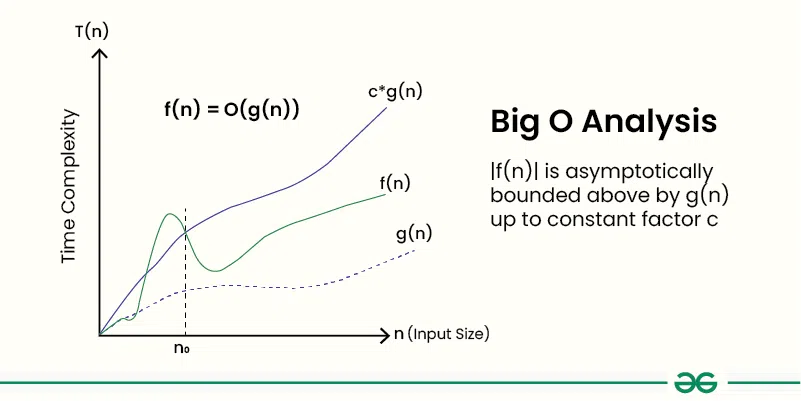
In the home office, the smart display acts as a secondary dashboard for your calendar, smart home metrics, and even system performance. When calculating the efficiency of your home network to support multiple 8K smart displays, understanding the backend logic is similar to algorithmic efficiency.
Using a desk-arm mount allows you to swing the display into your field of vision during deep-work sessions and push it away when you need more desk real estate. This flexibility is key for ergonomic health and maintaining a clutter-free workspace.
Technical Considerations for 2026 Hardware
Modern displays are thinner and more fragile than their predecessors. Following installation best practices is vital to protect your investment and ensure safety.
Safety and Structural Integrity
Always use a stud finder. While 2026 displays are lighter than ever, the leverage exerted on a mount can still damage drywall if not anchored correctly. If you are mounting on brick or concrete, use heavy-duty masonry anchors.
According to industry safety standards, you should always keep the original packaging for the duration of the warranty. If you need to move or service the display, the original pallet and foam are the only way to ensure the delicate LCD or Micro-LED panel remains intact during transit.
Connectivity: Wi-Fi 7 and Thread
By 2026, Wi-Fi 7 and Thread protocols are standard. However, a wall-mounted display can sometimes suffer from signal attenuation if it is placed too close to metal studs or large mirrors. Test your signal strength at the exact mounting location before committing to the installation. If the signal is weak, consider a wired backhaul via a hidden Ethernet port.
Enhancing the User Experience with Lighting
Lighting plays a massive role in how we perceive digital displays. To reduce eye strain and improve the “pop” of your screen, implement bias lighting.
LED Strips: Attach smart LED strips to the back of the mount.
Dynamic Sync: Program the lights to match the color temperature of the room’s ambient light.
Motion Sensors: In 2026, we use integrated sensors to wake the display only when someone enters the room, saving energy and extending the life of the panel.
Common Pitfalls to Avoid
Even with the best tech, a few common mistakes can ruin the experience:
- Mounting too high: Often called “TV-above-fireplace syndrome,” this leads to neck strain.
- Ignoring the “Touch” in Touchscreen: If the display requires physical interaction, don’t mount it behind a sofa or over a wide counter where you have to lean awkwardly to reach it.
- Inadequate Cooling: Even slim displays generate heat. Ensure there is at least a half-inch gap between the wall and the device for passive airflow.
Conclusion: A Future-Proof Home
Mounting a smart display in 2026 is an exercise in balancing technology with interior design. By focusing on hidden cable management, ergonomic viewing heights, and room-specific utility, you create a home that is both intelligent and beautiful.
Remember that the goal of a smart home is to reduce friction. A well-mounted display should feel like a natural part of the room’s architecture—always there when you need it, but never in the way. Whether you are tracking your home’s energy efficiency or following a gourmet recipe, the right mount makes all the difference.