
Is your smart tablet constantly tethered to a power outlet? If you’re wondering how to optimize your smart tablet for better battery longevity, you’re in the right place. As we move further into 2026, our reliance on mobile devices for work, creativity, and entertainment has never been higher. If you find yourself reaching for the charger before the day is done, it is time to take control of your device’s energy consumption and overall power consumption.
Optimizing your tablet isn’t just about surviving the day; it is about preserving the long-term health of your lithium-ion battery and mitigating battery degradation. By implementing a few strategic adjustments and utilizing built-in energy-saving features, you can significantly extend both your daily usage time and the total lifespan of your device. This guide will show you how to optimize your smart tablet for better battery longevity.
Understanding the Battery Drain Culprits
Before diving into settings, it is essential to understand what drains your power. In 2026, modern tablets are equipped with powerful processors and high-refresh-rate displays. While these features make for a smooth experience, their processor efficiency is key to managing the primary consumers of energy.
Background application activity, constant connectivity, and high-intensity display settings are the “silent killers” of battery life. When you leave apps running in the background, receive frequent push notifications, allow your tablet to search for Wi-Fi in areas with poor signal, or have high cellular data usage, your battery works overtime.
1. Master Your Display Settings
The screen is arguably the most power-hungry component of any tablet. By making small, intelligent adjustments to how your display behaves, easily found within your device settings menu, you can reclaim hours of battery life.
Enable Adaptive Brightness: Let your tablet’s AI sensors adjust the screen brightness based on your ambient environment. This prevents the screen from being unnecessarily bright in dim rooms.
Lower the Refresh Rate: If your tablet supports it, toggle your display refresh rate from 120Hz down to 60Hz. You will save a significant amount of power, especially during reading or web browsing.
Use Dark Mode: If your tablet features an OLED display, switching to a system-wide Dark Mode can save substantial power, as the pixels stay turned off when rendering black colors.
Shorten Screen Timeout: Set your “Auto-Lock” or “Screen Timeout” to 30 or 60 seconds. An idling screen is a wasted resource.
2. Manage Connectivity and Background Processes
Your tablet is constantly communicating with the world, but it doesn’t need to do so 24/7. Managing how your device connects to the internet and controlling app permissions management is a proven strategy for battery longevity, and a key step in how to optimize your smart tablet for better battery longevity.
Disable Unnecessary Radios: If you aren’t using Bluetooth, GPS, NFC, or actively using cellular data usage, turn them off. These features frequently ping for signals, which drains the battery in the background.
Restrict Background App Refresh: Many apps update their content and send push notifications even when you aren’t looking. Go into your settings and restrict “Background App Refresh” to only the most essential apps like email or calendar.
Optimize Location Services: Instead of allowing every app to track your location “Always,” change permissions to “While Using” or deny them entirely for apps that don’t need location data to function.
3. Smart Charging Habits for 2026
Extending battery life is not just about what you do while using the device—it is also about how you charge it. This is a crucial aspect of how to optimize your smart tablet for better battery longevity. Lithium-ion batteries have a limited number of charge cycles, and extreme temperatures or constant 100% charging can accelerate battery degradation.
Avoid the 0% to 100% Trap: Batteries are happiest when kept between 20% and 80%. Avoid letting your tablet hit zero, as this puts significant chemical stress on the battery cells.
Use Optimized Charging: Modern tablets in 2026 come with “Optimized Battery Charging” features. Keep this enabled; it learns your daily routine and delays charging past 80% until you are ready to start your day.
Keep it Cool: Heat is the enemy of longevity. Avoid charging your tablet in direct sunlight or leaving it in a hot car. Charging generates heat naturally, so try to charge your device on a hard, flat surface to allow for proper airflow.
4. Utilize Power Saving Modes
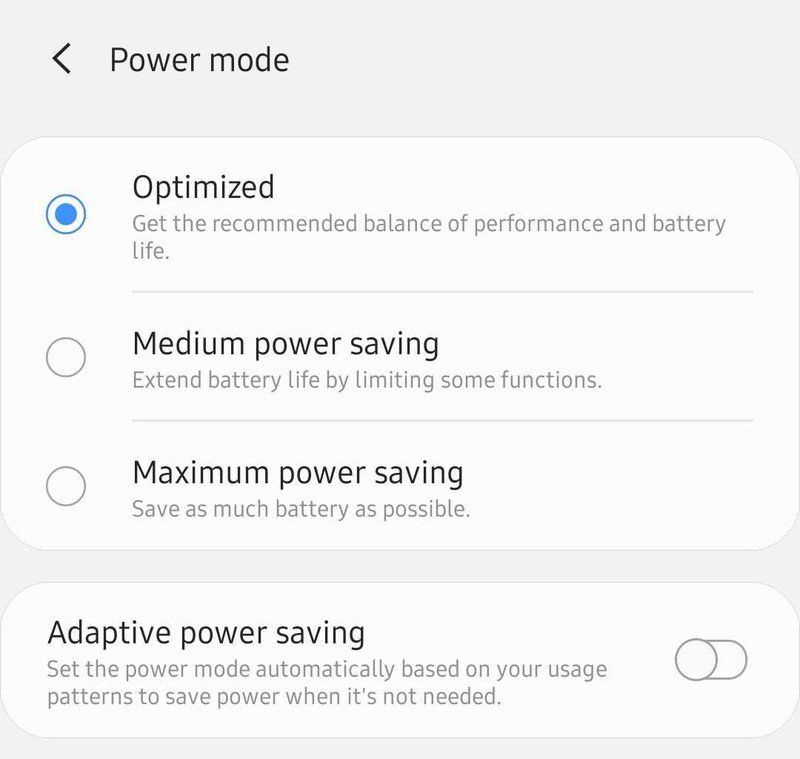
Don’t be afraid to use the built-in software tools provided by the manufacturer. Android and iPadOS have become incredibly sophisticated in 2026 regarding power management, offering excellent energy-saving features for how to optimize your smart tablet for better battery longevity.
When you know you will be away from a charger for a long time, activate Power Saving Mode early. This mode automatically throttles CPU performance, improving processor efficiency, limits background sync, and reduces visual effects, giving you a much-needed buffer.
5. Keep Your Software Updated
Manufacturers frequently release firmware and operating system updates that include battery optimization patches. These updates often fix “buggy” apps that were causing excessive drain or improve the efficiency of the operating system’s kernel. Always check for updates in your system settings to ensure you are running the most efficient version of your software.
Conclusion: Consistency is Key
Optimizing your smart tablet for battery longevity is not a one-time task; it is a habit. By consistently applying the tips on how to optimize your smart tablet for better battery longevity, monitoring your power usage stats through battery health monitoring, managing your display, and charging your device with care, you can ensure your tablet remains a reliable companion for years to come.
Start by implementing the “20-80” charging rule and auditing your background app permissions today. You will likely notice a difference in your tablet’s performance within just a few charge cycles, proving the effectiveness of how to optimize your smart tablet for better battery longevity. Remember, a well-managed battery is the foundation of a high-performing digital experience.